Java to Kotlin
Available in: IntelliJ IDEA Ultimate
Use this page to configure AI-assisted Java-to-Kotlin conversion: the model that performs the conversion, its execution limits, and the skill and refinement rules that shape the generated Kotlin.
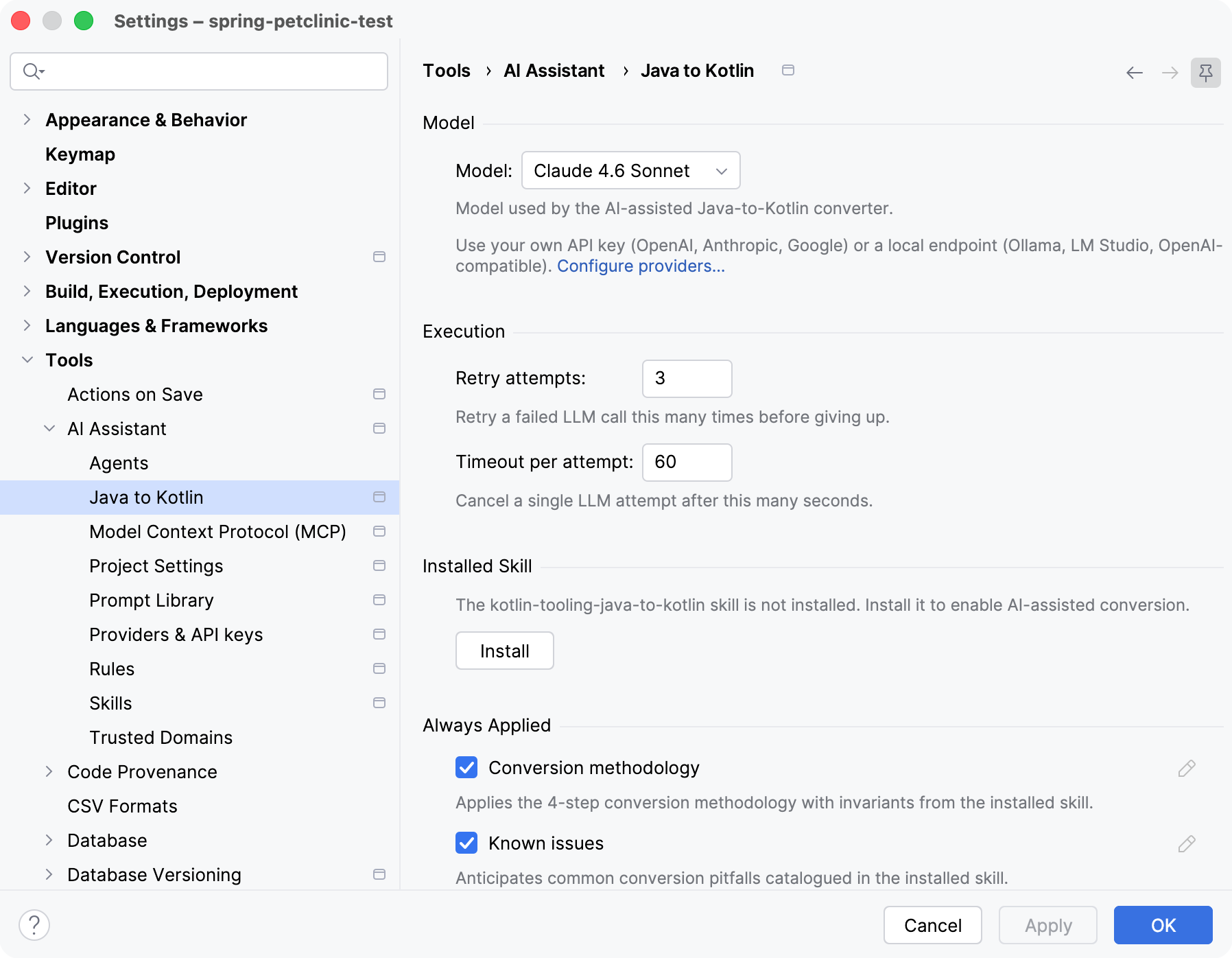
Model
Item | Description |
|---|---|
Model | Select the model that performs the conversion. The list includes JetBrains AI models and any models from third-party providers you have configured. Which models are available depends on your subscription and provider configuration. |
Configure providers | Opens the Providers & API keys page, where you can use your own API key or a local endpoint, for example, Ollama or LM Studio, for the conversion. |
Execution
Item | Description |
|---|---|
Retry attempts | The number of times AI Assistant retries a failed model call before it stops. Default: 3. Range: 1–5. |
Timeout per attempt | The time limit for a single model call, in seconds. If a call does not finish within this time, AI Assistant cancels it. Default: 60. Range: 10–600. |
Installed Skill
AI-assisted conversion uses the kotlin-tooling-java-to-kotlin skill to refine the generated Kotlin. Basic conversion works with built-in defaults, but the framework-specific refinements described below require this skill to be installed.
Item | Description |
|---|---|
Status | Shows whether the skill is installed, installed but disabled, or not installed. When the skill is not installed, the page shows a message that the |
Install | Opens the Skills page, where you can install the skill. This button does not install the skill directly. |
Always Applied
These refinements apply to every file during conversion. Both are enabled by default. To view or customize the underlying rules, click the edit icon next to a refinement; to revert your changes, click Restore Default. Editing is available only when the skill is installed.
Item | Description |
|---|---|
Conversion methodology | Applies the staged conversion methodology from the installed skill so the generated Kotlin follows a consistent approach. |
Known issues | Anticipates common conversion pitfalls catalogued in the installed skill. |
Framework-Specific (Auto-Detected per File)
AI Assistant detects the frameworks used in each file by scanning its imports and applies the matching refinements. All options are enabled by default and require the kotlin-tooling-java-to-kotlin skill. When the skill is not installed, these options are unavailable and the page shows a hint to install it. To customize a refinement, click the edit icon next to it.
Item | Description |
|---|---|
Spring | Refines Spring beans, configuration, and annotations ( |
Lombok | Replaces Lombok annotations with idiomatic Kotlin equivalents. |
Hibernate / JPA | Refines JPA entities and Hibernate mappings ( |
Jackson | Refines Jackson serialization annotations ( |
JUnit / TestNG | Refines test classes for JUnit and TestNG. |
Mockito | Adapts Mockito patterns to Kotlin, for example, open classes and mockito-kotlin idioms. |
RxJava | Refines RxJava streams ( |
Dagger / Hilt | Refines Dagger and Hilt injection modules and components. |
Guice | Refines Guice modules and injection annotations ( |
Micronaut | Refines Micronaut beans and configuration ( |
Quarkus | Refines Quarkus CDI and enterprise APIs ( |
Retrofit / OkHttp | Refines Retrofit interfaces and OkHttp clients ( |
For the conversion workflow, refer to Convert Java to Kotlin.