Set top-up limits for users
You can set a monthly top-up AI Credits limit for any user with a license with AI assigned to them. If the per-user top-up limit is set, it overrides the default limit configured on the Settings page. You can adjust the limit at any time or restrict access to top-up AI Credits by setting the limit to zero.
The top-up AI Credits limit is associated with the license with AI. When you set the limit for the user, it applies to each license with AI you assigned to them, but only after the user first interacts with AI under that license.
You can set the same limit for multiple users at once. This is useful when several users have reached or are close to their total AI Credits limits, and you need to update their limits simultaneously.
If there are no available top-up AI Credits, you can purchase additional top-up AI Credits for your organization.
Set a top-up AI Credits limit
Log in to JetBrains Central Console.
In the sidebar, under AI management, select Users and licensing.
Search for a user either by scrolling through the list or using the search box at the top of the page. For details, see Searching for users.
Click the value in the Top-up limit column.
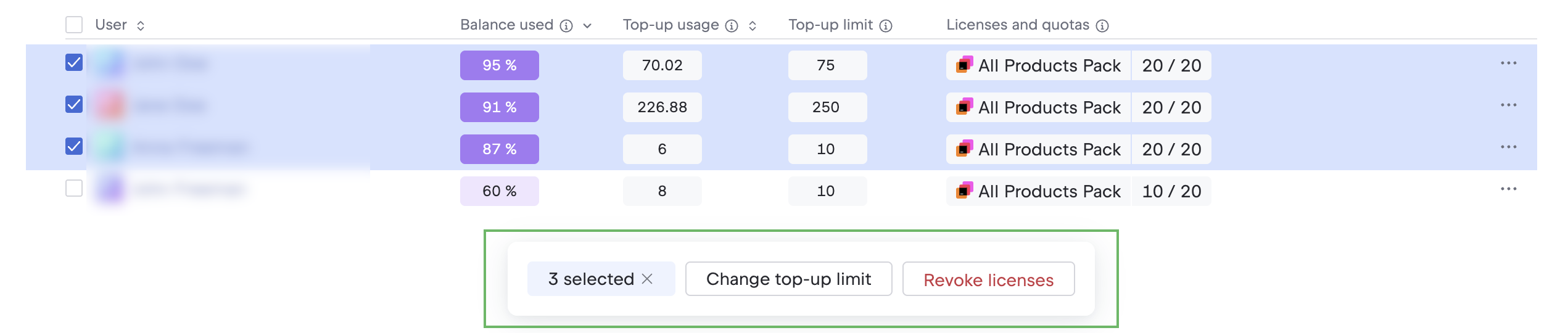
To set the same limit for multiple users, select them using checkboxes in the User column and click Change top-up limit on the toolbar below the table.
In the Top-up AI Credits per month field in the popup, enter the number of top-up AI Credits that can be spent each month.
Click Save top-up limit.
You can adjust the limit at any time using the same steps.