AI Agents for Developers / Single Agent vs. Multi-Agent Systems

Single Agent vs. Multi-Agent Systems

The decision to run a single-agent or multi-agent system is one of the first real architectural choices developers face when building AI-assisted workflows. It looks simple on the surface (one agent or many?), but it carries real consequences for debugging, observability, operational overhead, and how well the system scales as requirements grow.

Single-agent designs are usually simpler to build and easier to control, while multi-agent designs support specialization and parallel execution at a coordination cost that many teams underestimate.

This article works through the architectural trade-offs between the two approaches: workflow differences, orchestration complexity, scalability, reliability, and where each design fits best in real development workflows.

"On average, developers report that approximately 46% of the code they produce is fully generated by AI agents, 39% is written with AI assistance, and 27% is written entirely manually."

Source: Preliminary findings from the JetBrains Developer Ecosystem Survey 2026 • 15,000+ developers worldwide

What is a single-agent system?

A single-agent system uses one primary agent to handle the complete workflow: reasoning through a problem, deciding which tools to call, executing tasks, and returning results, all within a single execution context. That agent can still track state across steps and run its own control logic; what it doesn't do is hand part of the job to another agent that owns it. It's often the stronger choice for most well-scoped developer tasks.

AI agents in this model work like skilled generalists working alone. A developer might delegate a task ("investigate why the payment service is timing out under load"), and the agent will draw on the full project context to investigate, read source files, run relevant test cases, and report back its findings. All of that happens within a single execution context, and the AI agent architecture remains flat.

Single-agent systems tend to work best where the execution path is predictable, such as coding assistance, debugging specific issues, generating tests for a module, writing documentation, or investigating a failing CI job. These are tasks a single agent with good tool access and enough context can complete without coordinating with anyone else.

The operational upside is concrete. Single-agent workflows are simpler to monitor, easier to debug (usually one trace, one log stream, and one set of tool calls), and generally less complex to evaluate. When something goes wrong, the failure surface is contained.

What are multi-agent systems?

Multi-agent systems coordinate multiple specialized agents, each with distinct roles, context windows, or tool access, to decompose and distribute work across independent processes. A planner breaks down a task, a coding agent implements it, a testing agent validates the output, and a review agent checks for quality. Multi-agent systems trade simplicity for specialization and scale. When agents need to cooperate rather than one agent executing alone, you've likely crossed into multi-agent territory.

The real difference: Centralized vs. coordinated workflows

The difference between single-agent and multi-agent systems comes down to where workflow control lives. Single-agent systems centralize execution within a single operational context. Multi-agent systems distribute that control across cooperating processes, each of which may have its own tools, memory, and decision-making. That one distinction drives every downstream consequence: how you debug failures, how you observe what's happening, how you handle retries, and how the system behaves when one component fails.

Dimension

Single-agent

Multi-agent

Architecture style

Centralized

Distributed / coordinated

Workflow coordination

One agent manages all steps

Multiple agents cooperate via messages or a shared orchestrator

Scalability

Scales across independent runs; limited within a single coordinated task

Suited to coordinated specialization across subtasks of one task

Orchestration complexity

Generally lower

Generally higher, requires coordination logic between agents

Observability

Generally one trace and one log stream

Requires distributed tracing across multiple agents

Debugging difficulty

Generally lower, one execution context

Generally higher, failures may cascade or span multiple agents

Specialization

Generalist by design

Each agent can be tuned for a specific role

Operational overhead

Generally lower

Generally higher, more moving parts to manage and monitor

Failure handling

Single failure point, more direct recovery path

Cascading failures possible, and retry logic is more complex

Ideal use cases

Coding assistants, debugging, doc generation, test execution

Autonomous coding pipelines, multi-stage CI/CD, large-scale DevOps automation
Multi-agent architecture is worth adopting deliberately rather than by default. If the workflow doesn't require specialized subtasks or genuinely independent parallel work, start simple. Distributed coordination adds real complexity, and that complexity is the cost to weigh before adopting a multi-agent design.

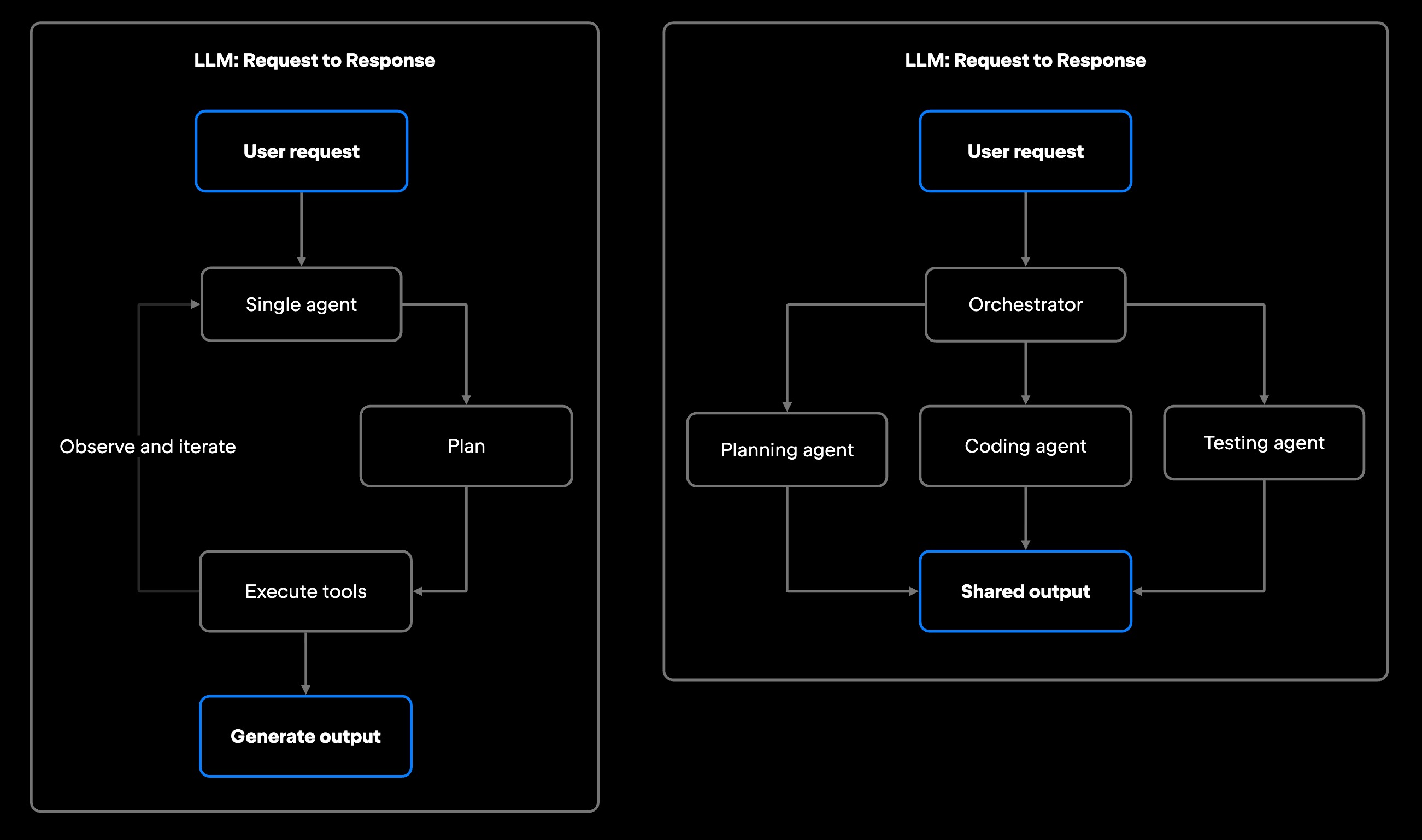
Single Agent vs Multi-Agent Systems

A single agent runs one flat loop; a multi-agent system routes work through an orchestrator to specialized agents that feed a shared output. Every added box is another component to coordinate, observe, and recover.

Benefits and trade-offs of single-agent systems

Single-agent systems win on operational simplicity. There's one execution context to reason about, one set of prompts to tune, one log stream to watch, and when something fails, one place to look. For teams early in their AI adoption, or for workflows that don't genuinely require specialization, that simplicity pays off fast. The architecture stays transparent and debuggable from day one.

Centralized execution also makes evaluation more straightforward. You can replay a single agent's trace, swap out the model, adjust the system prompt, and observe what changes. In a multi-agent system, evaluating the effect of a prompt change in one agent means tracing that change's downstream impact across the entire pipeline.

Security and access control are simpler, too. A single agent holds a single set of permissions, so the access you grant it, its API key, and the tools it is authorized to use are all part of the security surface. There's no fleet of independently permissioned agents to keep in sync and no role-based access to coordinate across processes.

Single-agent systems do hit walls. The most common bottleneck is context length: complex workflows that require reading across dozens of files, running multiple test suites, and synthesizing results often exceed what a single context window can handle well. Performance can suffer where work genuinely benefits from specialization. A single agent can issue independent tool calls concurrently, but every result returns to the same reasoning loop, so it can't bring a differently-tuned agent to each strand of the work. A single generalist agent is also rarely as sharp on a specialized job as an agent tuned for exactly that job, with a targeted system prompt, a relevant retrieval layer, and focused tool access.

Benefits and trade-offs of multi-agent systems

Multi-agent systems suit workflows that need specialization, parallel execution, or decomposition of complex tasks across independent processes. They earn their place when different subtasks genuinely benefit from distinct model configurations, tool access, or retrieval scope. Context pressure on its own is usually not the signal: Better retrieval, decomposition, or context management inside a single-agent workflow often solves it at lower operational cost.

Specialization is where multi-agent designs pull ahead. Different agents can be tuned for distinct roles:

  • A planning agent focused on decomposing requirements into discrete subtasks.
  • A coding agent with targeted context on a specific service or codebase section.
  • A testing agent with access to test frameworks and coverage data.
  • A review agent running static analysis and style checks.
  • A retrieval agent querying across documentation, APIs, and related repositories.

Each agent can carry a tighter, more focused context window and a more targeted system prompt than a generalist would. Parallelism is the second payoff: When subtasks don't depend on each other, several of these agents can run at once instead of in sequence, which cuts wall-clock time considerably.

The costs land on the other side of the ledger. Multi-agent architecture creates operational complexity that teams tend to discount. Coordinating agents requires explicit orchestration logic: rules for how agents communicate, who retries failed steps, and what happens when one agent's output is unusable to the next. Shared state across agents is a recurring source of subtle bugs.

Permissions get harder in the same way security got easier for single agents. Each agent needs its own scoped access and tool authorizations. Least privilege per agent is safer in principle, but it multiplies the governance surface: more keys, more authorization scopes, and more places a permission can drift out of alignment. This is the point where a governance layer starts to earn its keep. JetBrains Central is designed to address part of this by providing governance, policy enforcement, and centralized observability across IDEs, CLI tools, and web interfaces, with some of that functionality already available via the Central Console. Its capabilities also include shared semantic context across repositories, aiming to help each agent generate more accurate, context-aware code with fewer review cycles once it's broadly available.

Debugging is harder, too, though the coordination, observability, and failure-handling section below treats that in full.

When developers should use single-agent systems

Start with a single-agent architecture when your team is small, the workflow is sequential, or you're still learning how agents behave in your environment.

Reach for a single-agent approach when:

  • The workflow is well-scoped: examples include a coding assistant for a specific repository, a debugging agent for a known service, or a documentation generator for a defined set of files, with narrow inputs and outputs that fit within one context.
  • The team is in the early stage: Multi-agent coordination creates operational overhead that a team of one to three engineers often can't effectively manage or monitor.
  • Traceability is the priority: When you need to see exactly what an agent did and why, one execution path is far easier to follow than work spread across several.
  • The task is sequential by nature: If step B always depends on step A, running them in separate agents adds coordination cost with no benefit.

A Junie-based debugging workflow in a JetBrains IDE, where a developer fires off "investigate the authentication failure in code" and reviews the result asynchronously, is a good example. A documentation agent that reads a codebase and updates markdown files, or a test generation agent that takes a module and produces unit tests, generally follow the same pattern at moderate scale. These workflows typically need only one capable agent with the right tool access, and inter-agent coordination adds little to no value here.

When developers should use multi-agent systems

Knowing when to use multi-agent systems comes down to a few concrete signals.

  • Parallel work is available: Tasks that can run concurrently without dependencies on each other, such as running security scans, generating tests, and updating documentation for the same PR at the same time.
  • Specialization produces meaningfully better results: An agent tuned for one job, like a migration agent that knows your schema conventions and rollback patterns, outperforms a generalist asked to do everything.
  • The workflow spans the full SDLC: Examples include enterprise support routing, multi-stage CI/CD automation, and large-scale DevOps workflows that touch repositories, infrastructure, and monitoring, all of which can benefit from distributed orchestration.
  • Scale requires it: Teams running dozens or hundreds of concurrent agent tasks across multiple repositories need two distinct things: runtime orchestration that routes and executes the work, and an organization-level layer above it for policy enforcement, cost tracking, audit trails, and visibility into which models and agents are running. JetBrains Central is positioned at that second layer.

A practical example is a code review pipeline where an orchestrator routes a pull request through specialized workers: A security agent checks for vulnerabilities, a testing agent verifies test coverage, and a review agent generates inline comments for a developer to sign off on. The agents run within scoped permissions and still surface their work for human approval, so autonomy here stays bounded. The stages depend on each other, so the payoff is specialization rather than parallelism: Each agent is tuned for its step and does sharper work than a single generalist cycling through all of them.

Coordination, observability, and failure handling

Multi-agent architecture gets expensive here. The operational concerns that stay trivial in single-agent workflows turn into real engineering once you distribute work across multiple agents, and this is where most of that coordination cost actually lands.

Someone has to decide execution order, when to retry a failed agent, how many times, and when to escalate to a human instead of retrying. If the planning agent returns ambiguous output, does the coding agent proceed or block? A single agent already runs a control loop of its own, but coordinating several means that logic has to span independent processes, through a dedicated orchestrator agent, a workflow engine or orchestration framework, or coordination logic you write yourself. None of them is free.

How that coordination is arranged, whether a central orchestrator directs workers or agents react to shared events, is its own design space with its own failure modes, covered in the How AI Agent Orchestration Works. What matters for the decision at hand is that some arrangement is unavoidable, and none of them is free.

Failures behave differently across a distributed system. In a single-agent workflow, a failed tool call typically produces a clear error in one trace. In a multi-agent workflow, a failure in one agent may not surface immediately. It might produce subtly wrong output that causes a different agent to fail further down the pipeline. Root-cause analysis across distributed agent traces is harder than debugging a single execution.

Agents that need to share context (a coding agent passing its output to a testing agent, for example) require a reliable shared-state mechanism. The hard part is keeping that state structured, validated, and consistent as it crosses agents; the transport matters less than the contract it carries. Structured shared memory or a context store helps, but adds architectural complexity.

As the system gets more distributed, observability stops being automatic. AI agent monitoring here means distributed tracing, correlating what each agent did into a single picture, backed by the traces and logs to reconstruct a run. A managed governance platform can centralize that; teams running custom systems instrument it themselves. Debugging AI agents across the pipeline, and choosing how to coordinate them, are both decisions worth making explicitly before production.

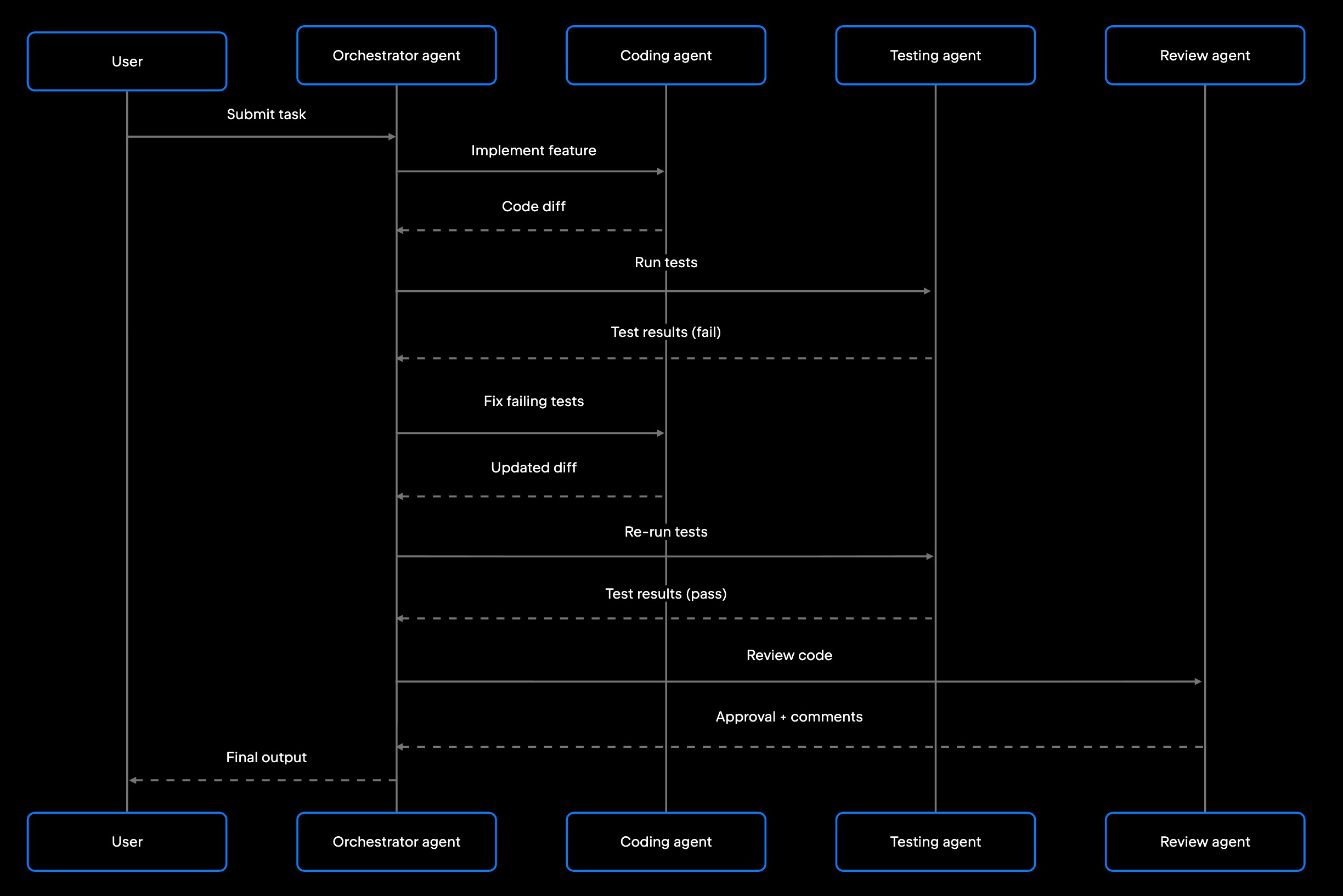
Multi-agent coding workflow with orchestrator, coding, testing, and review agents

A supervisor-worker loop: every arrow is a handoff the orchestrator has to route, observe, and recover if it fails. The coordination this diagram makes visible is exactly the overhead a single-agent workflow never pays.

What this means for developers

The architecture decision comes down to what your workflow actually needs.

Single-agent systems are the right default for most teams building their first AI-assisted workflows. They're faster to build, cheaper to operate, easier to debug, and sufficient for a wide range of developer tasks. A single well-configured agent with good tool access (reading code, running tests, calling APIs, writing to files) can handle a wide range of coding assistant, debugging, and documentation workflows without needing coordination between agents.

Multi-agent systems make sense when workflows outgrow what a single agent can handle: When parallel execution genuinely reduces time on task, when specialization produces better results than a generalist, or when the SDLC scope is broad enough to require distributed orchestration and governance. At that point, the coordination and governance layer becomes infrastructure in its own right, chosen as deliberately as the agents themselves. JetBrains AI for Teams and Organizations is one example of an organization-level layer of this kind, currently rolling out through an Early Access Program.

The most common mistake teams make is jumping to multi-agent architecture to solve a problem they haven't fully defined. Before introducing agent coordination, confirm that the bottleneck is actually the single-agent model and not the system prompt, tool access, or task decomposition. A well-tuned single agent gets further than most teams expect.

Start simple, and add agents when the workflow demands it.

FAQ

Are multi-agent systems always better than single-agent systems?

No. Multi-agent systems add real operational complexity: more orchestration logic, harder debugging, and more failure modes. They're justified when workflows genuinely require specialization, parallel execution, or SDLC-wide coordination. For most narrow, well-scoped developer workflows, a single agent is faster to build, easier to maintain, and easier to debug.

Why are multi-agent systems harder to debug?

Because a failure can move between agents before it surfaces. A single-agent workflow usually keeps the full execution in one trace. In a multi-agent workflow, a failure may originate in one agent and appear as a symptom in another, sometimes two or three steps later. Correlating failures across distributed agent traces takes dedicated observability infrastructure, and root-cause analysis is slower when execution spans multiple independent processes.

Do multi-agent systems require orchestration?

Yes, though orchestration doesn't have to mean a central orchestrator. Coordination can be handled by a dedicated orchestrator agent, a workflow engine, or an event-driven design in which agents react to shared events. What every multi-agent system needs is an explicit answer to who routes work, who retries a failed step, and where shared state lives. At organizational scale, JetBrains AI for Teams and Organizations is designed to provide a control plane for this, handling policy enforcement, agent routing, and observability across the development pipeline, though it's still rolling out through an Early Access Program.

When should developers start with a single-agent architecture?

Reach for a single agent first whenever one capable agent can hold the whole task in view: a bounded scope, a small team, and work that runs step by step rather than branching into parallel tracks. Coding help, targeted debugging, documentation, and test generation almost always fit that shape. It's also the safer place to begin while you're still learning how agents behave in your codebase, since one execution path is far easier to reason about than several.

Can multi-agent systems run agents in parallel?

Yes, and parallel execution is one of the main reasons to use them. JetBrains Air supports parallel agent task runs natively, with tasks isolated in Docker containers or Git worktrees. Tasks with no dependencies on each other are strong candidates for parallelization; tasks where each step feeds the next are not.

Damaso Sanoja

Damaso Sanoja is an engineer who is passionate about helping others make data-driven decisions to achieve their goals. This has motivated him to write numerous articles on the most popular relational databases, customer relationship management systems, enterprise resource planning systems, master data management tools, and, more recently, data warehouse systems used for machine learning and AI projects. You can blame this fixation on data management on his first computer being a Commodore 64 without a floppy disk.

JetBrains AI Solutions

Optimize your workflow. With AI built for you.

Junie

The AI coding agent with deep IDE integration that plans before it writes, then codes and tests while you stay in flow.

JetBrains AI in IDEs

Set of AI-powered capabilities built into JetBrains IDEs for software developers. It is not a standalone product or service, but an IDE-native experience composed of AI features, LLMs, agents, and integrations.

AIR

Agentic Development Environment for engineering teams building products with AI.

AI for Teams and Organizations

An open system for agentic software development. Govern AI access across your engineering org, manage agents and models, and keep costs under control.

JetBrains Context

A repository intelligence layer for coding agents. It builds a semantic index of your codebase so agents retrieve what they need instead of exploring it file by file.

Central CLI

One CLI for every terminal agent. Claude Code, Codex, Gemini, and others plug into JetBrains AI and behave exactly as they do standalone. Access is granted centrally and instantly, with models, limits, and usage analytics governed in one place.

Continue Exploring the AI Agents for Developers Guide

What Are AI Agents?

Understand how AI agents work and where developers use them.

Multi-Agent Systems

Learn how multiple AI agents coordinate to solve complex development workflows.

Agentic Workflows Explained

Explains agentic workflows, how AI agents plan and execute multistep tasks.