AI Agents for Developers / Types of AI Agents

Types of
AI Agents

Most teams use the term "AI agent" as if it describes a single thing. It doesn't. The types of AI agents you'll encounter in software development span a wide range of architectures, from reactive systems that map one input to one response to multi-agent pipelines that coordinate specialized roles across a full development lifecycle. Understanding the different types of AI agents separates a team that picks the right tool for the job from one that bolts on a planning agent where a reactive system would have worked fine, or vice versa.

This guide covers the major agent categories developers need to know: reactive agents, planning agents, tool-using agents, memory-enabled agents, autonomous agents, and multi-agent systems. What separates an agent from a one-off model call is the loop – a model acts, observes the result, and adjusts its approach accordingly. The categories differ in how much of that loop they run, and along a few axes that matter in practice: how much they plan, what tools they can call, what they remember, and how much they act without human approval. The piece closes with practical guidance on how to choose between them.

About 21% of developers generate more than 80% of their code using AI agents.

Source: Preliminary findings from the JetBrains Developer Ecosystem Survey 2026 • 15,000+ developers worldwide
Why AI agent taxonomy matters

An AI agent taxonomy gives you a vocabulary for making architectural decisions. Without it, "AI agent" becomes a catch-all that obscures real differences in how systems behave, fail, and scale.

Two systems, both marketed as "AI agents", can differ in how they handle memory, what tools they invoke, whether they keep state across steps, and how much they act without confirmation. Those differences decide whether a workflow is safe to automate, how you debug failures, and what permissions the system needs.

Taxonomy also sets accurate expectations with stakeholders. When an engineering manager asks "Can we use an AI agent for this?", the answer depends on which category fits the workflow's complexity, latency tolerance, and risk profile. The six categories below run roughly from simplest to most capable, and each category's ceiling is what motivates the next.

1. Reactive AI agents

Reactive agents sit at the simple end of the spectrum: They map the current input to a response in a single pass, without planning ahead or running the act-observe-adjust loop that richer agent types use. They're minimal enough that some definitions reserve the word agent for the loop-running types and call this a plain model call; this guide treats reactive systems as the baseline that richer types build on.

AI code completion in a JetBrains IDE is the everyday case: it reads your project context and predicts a likely completion, or your next edit, without planning a sequence of actions or checking the result in a loop. Support ticket triage, a single-turn chatbot that answers each question without recalling the last, and simple AI-backed workflow automation triggers share the same shape – a single response, with no loop to run.

That self-contained behavior makes reactive systems the most predictable class in the taxonomy, and the easiest to evaluate and debug since they have no intermediate state to inspect and no retry chains to trace, so a wrong output is easy to localize. They fit narrow, low-latency tasks with well-defined inputs.

The ceiling shows up the moment a task needs more than one pass: If the agent has to act, check the result, and adjust, it is no longer reactive. Anything with sequential dependencies needs planning and, often, memory.

One naming trap before moving on: A reactive agent is not a ReAct agent. Reactive means one input, one response, no loop; ReAct (reasoning + acting) is a multi-step loop that does the opposite, as ReAct Agents Explained lays out.

2. Planning and goal-oriented agents

Once a task has dependencies between steps, you need an agent that decomposes a goal into an ordered sequence and adjusts as it goes. Unlike a reactive agent, a planning agent maintains workflow state and can revise its plan when a step doesn't go as expected.

A debugging workflow shows the difference. In a tool-enabled workflow, the agent reads a stack trace, searches the codebase for the relevant function, inspects recent commits, formulates a fix, runs the test suite, and retries if tests fail. No single prompt handles all of that. The planning layer threads the steps together, tracks what it has already tried, and adapts when a fix doesn't hold.

Code migrations, issue investigation, test coordination, and deployment prep all share that property insofar as the next step depends on the outcome of the last. The planning algorithms behind these agents vary (chain of thought, ReAct, tree of thought, and others), and each trades reasoning depth against compute cost.

Planning agents still fail mid-chain. They get stuck in retry loops, generate plausible-looking but incorrect intermediate steps, or lose track of constraints. Building reliable agentic workflows means designing for those failure modes with validation checkpoints, step-level logging, and clear abort conditions. On its own, though, a planning agent reasons and sequences but stops at the plan; it can't act on the outside world. Closing that gap is what the next category does.

3. Tool-using AI agents

Give a planning agent AI agent tools, the ability to act on external systems by running terminal commands, querying databases, calling APIs, opening browsers, or triggering CI/CD pipelines, and it becomes a tool-using agent. That shift from describing actions to taking them is what makes the category useful, and it's also what makes it risky.

The mechanism is a tool-call loop. The model emits a structured request to call a named tool; the runtime executes it and feeds the result back into the model's context; the model decides the next step, and the loop repeats until the task is complete. That split between deciding and executing is the AI agent components model at work. A code review agent that checks out a branch, runs linters, and posts a comment is doing something qualitatively different from one that just prints suggestions for a human to run.

This is also where shared tool standards matter. In JetBrains IDEs, coding agents like Junie, Claude Agent, and Codex reach external tools through MCP (Model Context Protocol) servers, a standard interface that lets one agent connect to many tools without wiring up each integration by hand.

Tool access introduces real operational complexity because every tool call is a potential side effect. Agents need explicit permission boundaries that specify which files they can write, which APIs they can call, and which commands they can run. Without scoped permissions and approval gates for destructive operations, a tool-using agent is a liability. Tool use answers what an agent can do; the next question is what it can remember while doing it.

4. Memory-enabled and stateful agents

Memory is an orthogonal capability: A planning or tool-using agent becomes memory-enabled when it retains information instead of starting fresh. That retention comes in two forms: within-session runtime state and cross-session persistent memory, both of which let an agent accumulate context across a workflow.

Runtime state is the simpler form. An agent working through a long debugging session remembers which hypotheses it has tried, which files it has inspected, and the current working theory. That context lives in memory and evaporates when the session ends.

Persistent memory goes further by writing context to a store that outlives the session, usually a vector store or knowledge base that the agent writes to and later retrieves from. A repository-aware agent, for example, can query that store at the start of a task for relevant prior context, so a codebase's architecture, earlier decisions, or recurring conventions don't have to be re-established each time. In long-running projects, that retrieval step is what reduces the need for repeated ramp-up time.

The trade-off is orchestration complexity. Stateful agents force decisions about what to store, when to update it, when to evict stale context, and how to surface the right memory at the right moment. They also complicate observability: When an agent misbehaves, the cause might be the current input, the persisted state, or the interaction between them. Both forms reward a closer look, from the mechanics of memory in AI agents to the broader design question of stateful vs. stateless AI agents. Either way, memory raises the question of how much an agent should decide for itself, which is the heart of autonomy.

5. Autonomous AI agents

Autonomy is about how much an agent does without human input or approval. An autonomous agent runs bounded workflows within scoped permissions, making decisions, retrying failed steps, and coordinating subtasks without requiring a new prompt at each one. It sits on a spectrum, not a switch: from "suggests the next action for you to approve" to "completes the whole workflow and reports back".

Resolving a GitHub issue illustrates the high end: The agent reads the issue, locates the relevant code, writes a fix, runs the test suite, creates a branch, and opens a pull request, with no developer approving each step. At a lower autonomy level, the same workflow pauses for confirmation before writing any file.

Where you set that dial depends on the stakes: High autonomy suits low-risk, reversible tasks, while anything touching production, billing, or access controls needs guardrails regardless of how capable the agent is. Those guardrails include scoped permissions, approval gates, runtime limits, monitoring, and escalation paths. They are a topic in their own right, and What Are Autonomous AI Agents? covers the levels of autonomy, the guardrails, and the operational risks in depth.

6. Multi-agent systems

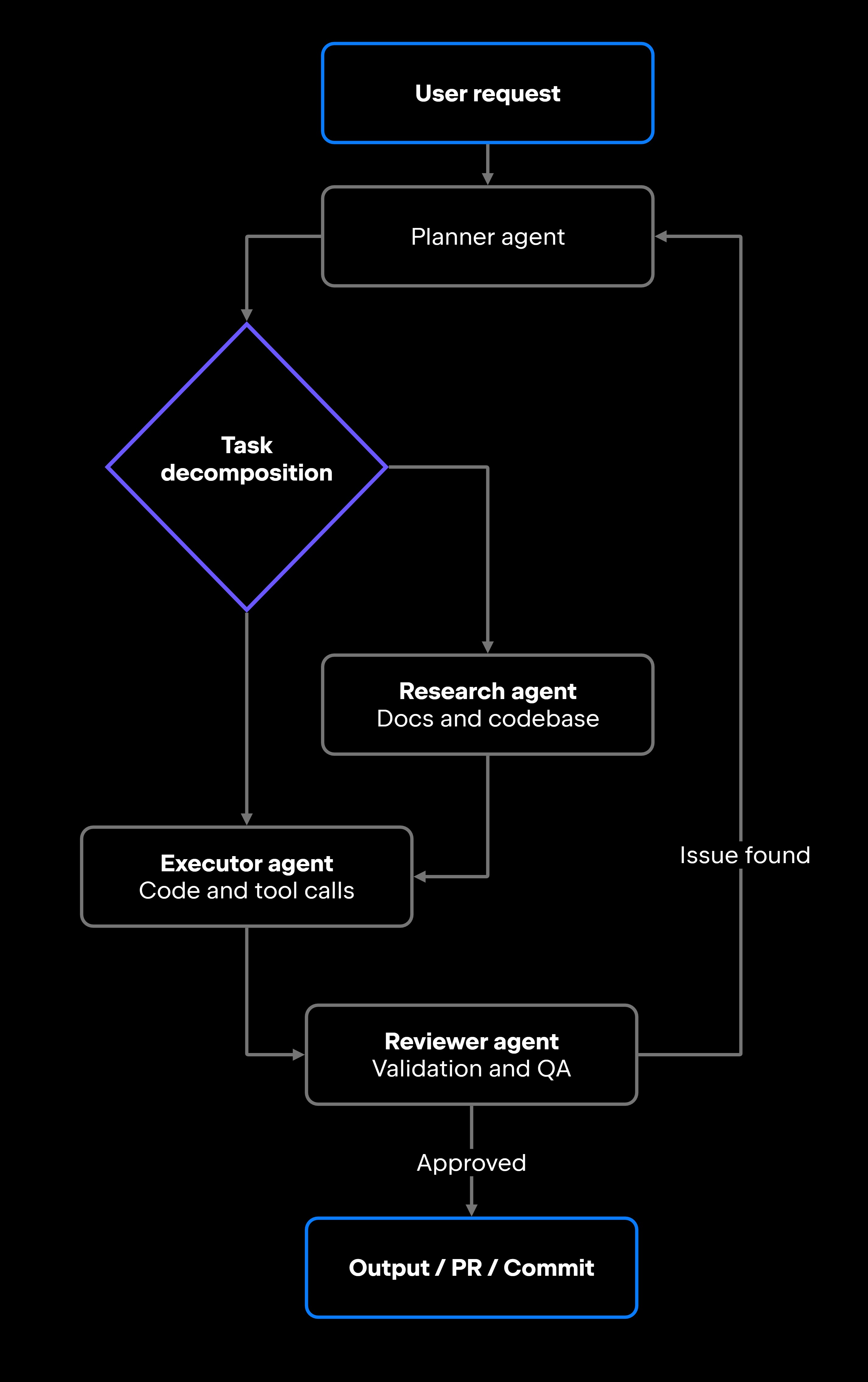
Sometimes, one agent juggling every role is the bottleneck, and the fix is to split the work across several specialized agents that each do one thing well and coordinate through shared state or an orchestration layer. Instead of a single agent that plans, researches, executes, and reviews all at once, each responsibility gets its own dedicated agent.

The planner-executor-reviewer triad is a common shape in software development. A planner decomposes the task and sequences the steps, an executor carries out operations such as calling tools and writing code, and a reviewer validates outputs, checks for regressions, and flags problems before anything is committed. A research agent often sits alongside them, gathering documentation or codebase context for the planner and executor to use.

Coordination is the hard part, and it usually runs through one of two mechanisms: a shared state store every agent reads from and writes to, or an orchestrator that routes each agent's output to the next and decides when to loop back. JetBrains Air takes a parallel approach at the developer's desk, letting you run several agents at once across planning, implementation, testing, and review, then return to check the results. AI agents in JetBrains IDEs bring agentic workflows directly into your interactive coding session.

The payoff is specialization plus parallelism, which can cut wall-clock time on complex tasks. The cost is coordination: orchestration logic grows quickly, an error in one agent can cascade into the others, and tracing a failure across several agents is harder than debugging one. For teams building these systems, AI agent orchestration is the core engineering challenge, and the broader patterns are covered in the dedicated Multi-Agent Systems for Developers guide.

Choosing the right AI agent architecture

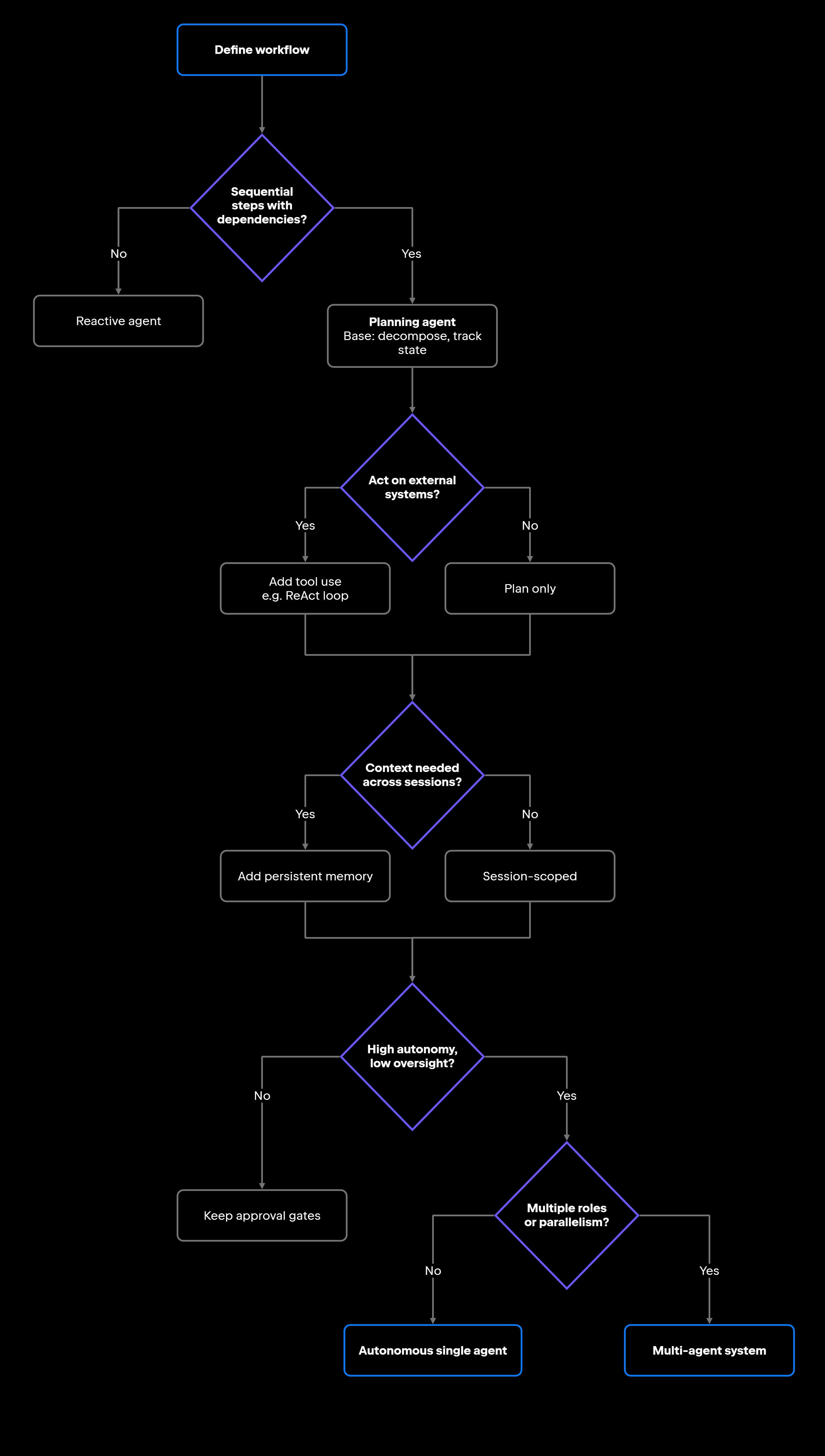
Matching an AI agent type to a workflow means weighing complexity, tool requirements, latency, and risk alongside raw capability. The decision tree below provides a practical starting point for choosing an architecture.

Work through these questions before committing to a design:

  • Workflow complexity: Does the task require sequential steps with dependencies, or is it a single-shot operation?
  • Tool requirements: Does the agent need to invoke external systems, or is text generation sufficient?
  • Latency: Can the workflow tolerate multi-second planning cycles, or does it need a sub-second response?
  • Reliability: What happens when the agent fails mid-workflow? Is the failure recoverable?
  • Permissions: What is the blast radius of an agent error? What approvals do you need in place?
  • Observability: Can you trace what the agent did at each step? Can you replay or audit actions?
  • Operational risk: Who is accountable if the agent takes an incorrect action?
  • Human oversight: At what points does a human need to approve, review, or intervene?

The categories aren't mutually exclusive, and the decision flow reflects that. Planning is the base for any multi-step task; tool use and memory are capabilities you add on top, not alternatives to planning. A ReAct-style agent, for instance, is a planning agent that also uses tools. The table below summarizes how these agent types compare in practice.

Agent type

Strengths

Limitations

Reactive

Low latency, easy to debug, predictable

No multi-step reasoning or retained state

Planning and goal-oriented

Multi-step reasoning, adapts to results

Slower, higher cost, can fail mid-chain

Tool-using

Permission complexity, side effects

Operational reach, acts on real systems

Ideal workflows

Single-shot, well-bounded responses

Tasks where each step depends on the last

Work that must read or change external state

Long or recurring work that reuses context

Orchestration overhead, observability gaps

Continuity across tasks and sessions

Memory-enabled and stateful

Bounded, lower-stakes task automation

Risk of unexpected actions without guardrails

Runs complex flows with little prompting

Autonomous

Pipelines that split into distinct roles

Coordination complexity, error propagation

Specialization, parallelism, scalability

Multi-agent

Most production systems combine several of these types. A real setup might pair reactive autocomplete for quick suggestions with a planning agent for structured debugging, tool-using agents for terminal and version-control work, and a review agent for validation, all running in environments such as JetBrains IDEs or JetBrains Air, where teams can work with different agents and models.

The architecture emerges from what the workflow needs, not from the most capable option available.

What this means for developers

An AI agent taxonomy changes how you approach AI-driven development. The question shifts from "should we add an AI agent?" to "which agent pattern fits this specific workflow, and what constraints should we put around it?"

Modern developer tools increasingly combine these patterns in a single place: reactive assistance, planning, tool orchestration, memory management, and bounded autonomy. Knowing which pattern handles which part of the workflow lets you configure and extend these systems deliberately instead of treating them as black boxes.

The practical skill is matching the pattern to the workflow’s requirements and constraints. The right agent for a low-latency autocomplete task won't fit a multi-step deployment pipeline, and getting that match right is what carries over from one project to the next.

FAQ

What type of AI agent should developers start with?

Start with a reactive agent. It's the easiest to implement, evaluate, and debug. Once you find its limits, typically when a task needs sequential steps or external tool calls, you'll have a clear signal for when to reach for something more complex.

Which AI agent types are easiest to control and evaluate?

Reactive agents are the most controllable, with no intermediate state to inspect. Tool-using and planning agents are harder, because you have to trace tool calls and intermediate reasoning steps. Autonomous and multi-agent systems demand the most investment in observability, logging, and approval workflows.

If an agent both plans and uses tools, which type is it?

Both, and that's normal. The categories describe capabilities that can be combined rather than mutually exclusive boxes. A ReAct-style agent is a planning agent that calls tools inside its plan; add cross-session memory, and it becomes memory-enabled, too. Classify by the capabilities a workflow actually requires, not by forcing the system into one label.

What are the main risks of tool-using AI agents?

The hard part usually isn't the first tool call; it's catching a bad one before it causes damage, so design for detection and recovery as much as prevention. Step-level logging records what the agent did and when, scoped permissions cap how far a mistake reaches, and reversible operations let you undo changes when something goes wrong. Approval gates remain the first line of defense for destructive actions.

Can one AI agent system include multiple agent types?

Yes, and many production systems do. A common pattern pairs reactive agents for quick-response tasks (like inline code suggestions) with planning and tool-using agents for longer workflows (like automated code review or migrations). JetBrains IDEs, for instance, combine AI code completion with coding agents available in the AI chat, with different patterns serving different purposes in the same IDE.

How do developers choose between single-agent and multi-agent systems?

Single-agent systems are simpler to build, test, and debug. Reach for a multi-agent architecture when a workflow genuinely needs specialized roles, such as separate planning and review stages, or when parallelism is a hard performance requirement. Don't add coordination complexity just because the technology supports it.

Are autonomous AI agents the same as AGI?

No. Autonomous agents execute bounded, scoped workflows within predefined permissions; they aren't making general-purpose independent judgments. Resolving a constrained, well-defined task is not the same as reasoning freely across arbitrary domains.

How does memory affect an AI agent’s reliability?

Memory improves continuity, so an agent doesn't have to re-establish context every session, but it adds failure modes. A stale or incorrect persisted state can make an agent behave unexpectedly, and that's harder to debug than a stateless system because the cause is no longer just the current input. Reliable stateful agents need clear policies for what to store, when to update it, and when to evict it.

Damaso Sanoja

Damaso Sanoja is an engineer who is passionate about helping others make data-driven decisions to achieve their goals. This has motivated him to write numerous articles on the most popular relational databases, customer relationship management systems, enterprise resource planning systems, master data management tools, and, more recently, data warehouse systems used for machine learning and AI projects. You can blame this fixation on data management on his first computer being a Commodore 64 without a floppy disk.

JetBrains AI Solutions

Optimize your workflow. With AI built for you.

Junie

The AI coding agent with deep IDE integration that plans before it writes, then codes and tests while you stay in flow.

JetBrains AI in IDEs

Set of AI-powered capabilities built into JetBrains IDEs for software developers. It is not a standalone product or service, but an IDE-native experience composed of AI features, LLMs, agents, and integrations.

AIR

Agentic Development Environment for engineering teams building products with AI.

AI for Teams and Organizations

An open system for agentic software development. Govern AI access across your engineering org, manage agents and models, and keep costs under control.

JetBrains Context

A repository intelligence layer for coding agents. It builds a semantic index of your codebase so agents retrieve what they need instead of exploring it file by file.

Central CLI

One CLI for every terminal agent. Claude Code, Codex, Gemini, and others plug into JetBrains AI and behave exactly as they do standalone. Access is granted centrally and instantly, with models, limits, and usage analytics governed in one place.

Continue Exploring the AI Agents for Developers Guide

What Are AI Agents?

Discover what AI agents are, how they work, their architecture, types, use cases, and how developers can build intelligent autonomous systems.

What is a ReAct agent?

Learn how ReAct agents combine reasoning, tool use, and feedback loops, where they work best, and how to manage reliability, cost, and latency.

Multi-Agent Systems

Learn how multi-agent systems coordinate AI agents, compare architecture patterns, solve complex workflows, and improve software development.