Enterprise AI Agent Use Cases for Engineering Teams
Source: Preliminary findings from the JetBrains Developer Ecosystem Survey 2026 • 15,000+ developers worldwide
FAQ
What are the most common enterprise AI agent use cases?
The most common enterprise AI agent use cases cluster into five areas: software development support, IT operations, customer support, knowledge management, and document-heavy business workflows. What puts a workflow in that group is its shape rather than its function: clear inputs, repeatable steps, a reviewable output, and human review before any high-impact action.
What enterprise workflows are best suited for AI agents?
AI agents in enterprise settings fit best where workflows are high-frequency, well-understood, and produce reviewable outputs: ticket summarization, documentation lookup, log analysis, draft preparation, and code investigation. Workflows needing context from several systems at once, such as a support ticket that requires account history plus a policy lookup, are also strong candidates, because multi-source gathering is what costs people the most time.
Can AI agents automate customer support or internal service desk workflows?
Agents can handle significant parts of support workflows: ticket classification, account history retrieval, knowledge base lookup, draft response preparation, and escalation notes. The design that works keeps agents in the research and preparation role and leaves the decision and the communication with people, so customer-facing messages, account and access changes, and cases without clear precedent all pass through human review.
How are AI agents used in enterprise software development?
Engineering teams use AI agents for tasks such as exploring unfamiliar codebases, generating tests, investigating build failures, and summarizing code changes. Junie, JetBrains' coding agent for professional software development, supports these multistep workflows in JetBrains IDEs and through Junie CLI. JetBrains Air Context complements coding agents by providing semantic search across indexed repositories, helping them find relevant code and dependencies with fewer exploratory steps.
How should companies choose their first AI agent use case?
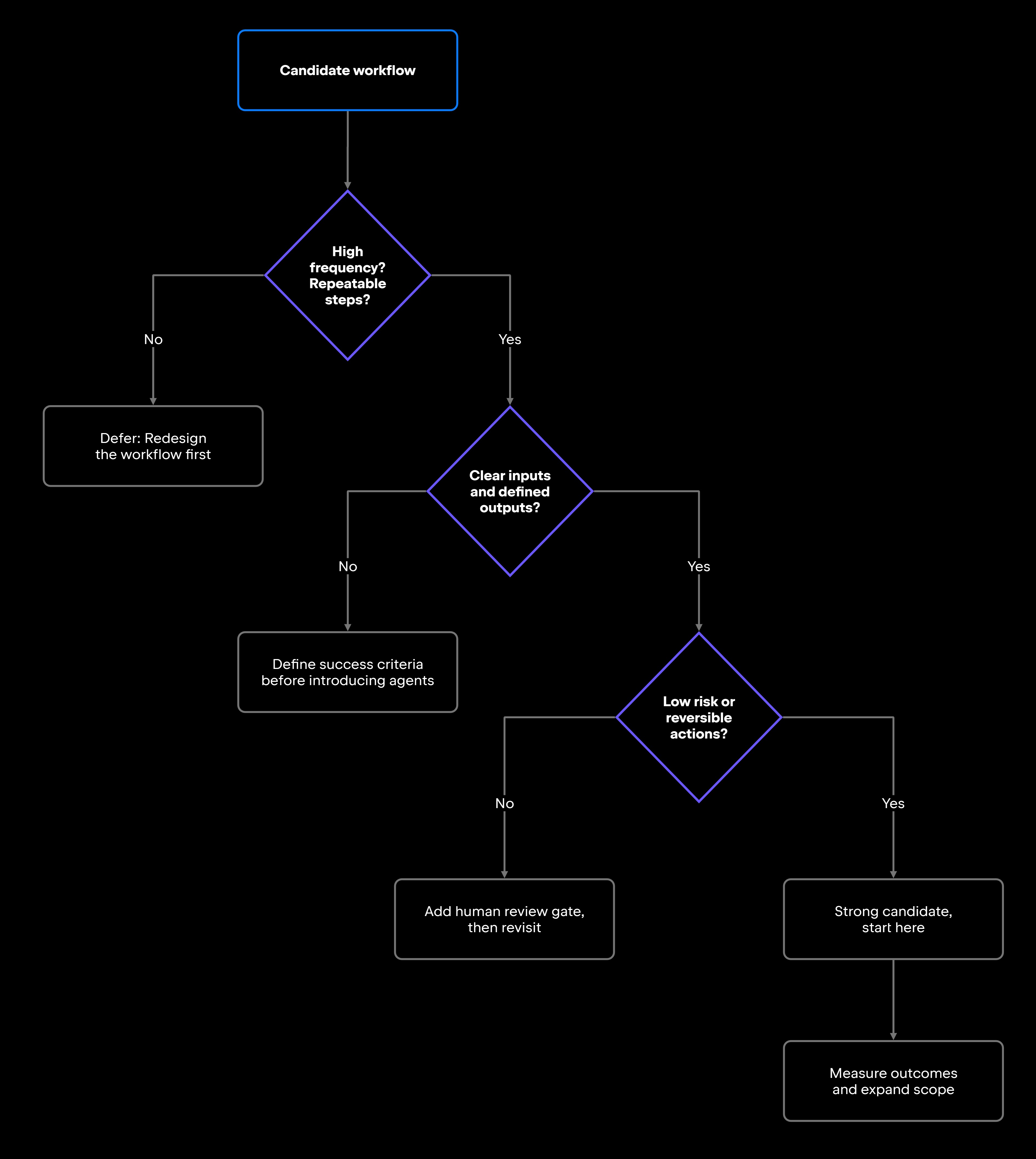
Start with a workflow that is already well understood and runs frequently. Confirm three things before deploying: that requests arrive in a consistent form, that whatever the agent has to read is actually reachable, and that someone has defined what a good result looks like. Low-risk workflows where agent suggestions get reviewed before any action follows are the right starting point. Leave high-stakes or difficult-to-reverse workflows for later, once the track record supports using agents for them.
What should enterprises consider before giving AI agents access to internal systems?
Access scope is the first consideration: Agents should only reach the systems and information required for their tasks, within the permissions granted to the users or services they represent. Organizations also need clear policies governing which models and agents are permitted, visibility into AI usage, and appropriate audit mechanisms. JetBrains Air Governance provides centralized management of AI access, organizational policies, and consumption monitoring across JetBrains and third-party agents, helping organizations maintain oversight as AI adoption expands.
Damaso Sanoja is an engineer who is passionate about helping others make data-driven decisions to achieve their goals. This has motivated him to write numerous articles on the most popular relational databases, customer relationship management systems, enterprise resource planning systems, master data management tools, and, more recently, data warehouse systems used for machine learning and AI projects. You can blame this fixation on data management on his first computer being a Commodore 64 without a floppy disk.
Use AI agents in your development workflow
Explore JetBrains AI solutions that help you build, use, and scale AI agents across the software development lifecycle.
Air Gateway
Run terminal agents through one JetBrains account, with access, models, and usage governed centrally.
Junie
Plan, code, debug, and automate tasks with a coding agent that works across your terminal, IDE, GitHub, and GitLab.
Air in IDEs
Orchestrate AI agents and verify their output directly in JetBrains IDEs, with full control over how changes are reviewed.
Air Teams
Automate software delivery workflows, coordinate agentic work across teams, identify bottlenecks affecting delivery.
Air Governance
Govern AI usage, models, policies, and costs across your organization, including JetBrains and third-party tools.
Air Context
Give agents shared organizational memory and context that carries across tools, workflows, and execution environments.
JetBrains Air
An open system of AI products for developers, teams, and organizations – from coding with agents to automating workflows and governing AI at scale.

Continue Exploring the AI Agents for Developers Guide
Explore how AI agents improve software development through code generation, testing, debugging, code review, and workflow automation.
Learn how AI agents automate DevOps workflows, including CI/CD, infrastructure management, monitoring, incident response, and operational efficiency.
Learn AI agent security best practices, including permission management, validation, monitoring, and secure workflow design for production deployments.