Automations
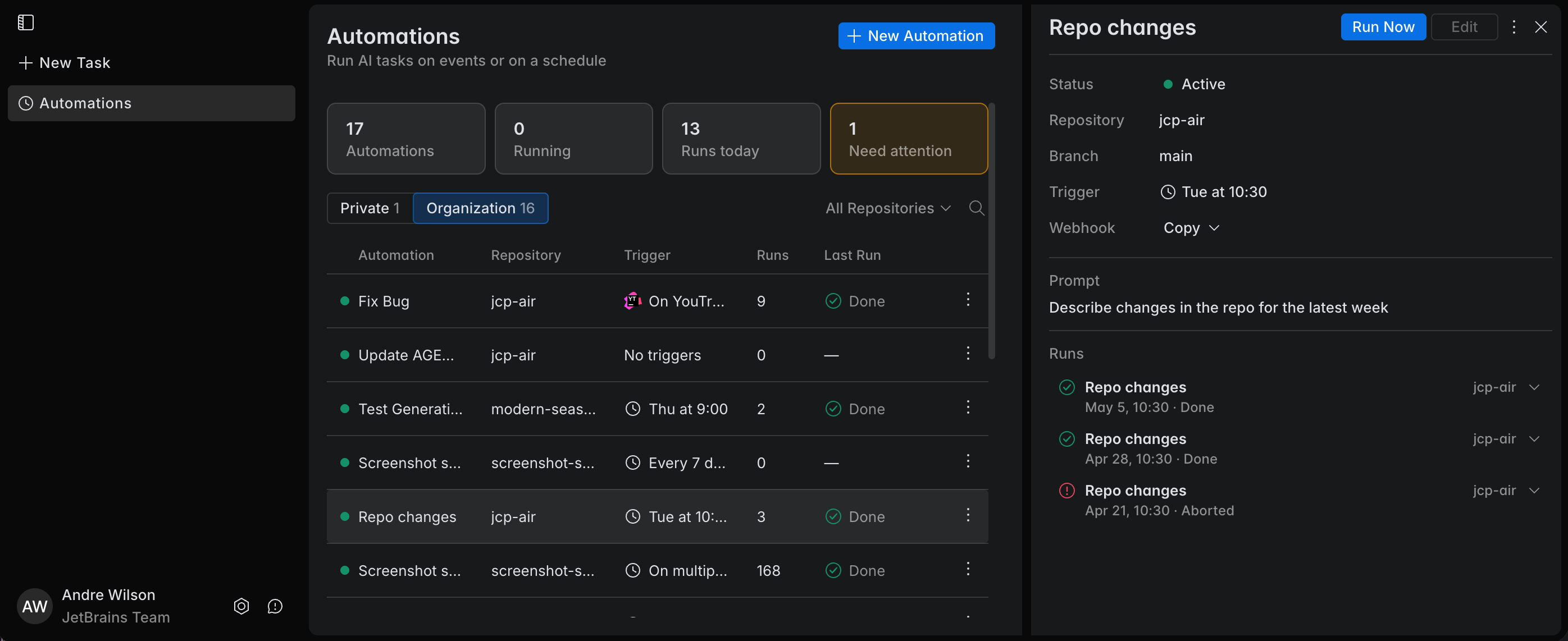
Automations are cloud tasks that Air Teams runs automatically when a trigger fires. They run in cloud environments, so you can use them for background work that does not require a person to start or supervise every run manually.
Each run is a cloud task – see How this differs from running locally.
Triggers control each run – what starts a run and what it does with any changes are set by the automation's triggers.
Results stay on the Automations page – once a run finishes, you can work with its result there – see Work with automation run results.
You manage automations in the browser – open Air Teams at https://air.jetbrains.cloud and go to the Automations page. See Manage automations.
Templates make a workflow reusable – to reuse the same workflow across repositories and teams, build it once as an automation template.
Why use automations
Automations let you add agentic workflows to your development lifecycle. In other words, they help you move some engineering tasks from manual execution to non-human, trigger-based execution.
Use automations for workflows that should run consistently in the background, react to external events, or happen on a schedule.
React to bugs and issues automatically – for example, investigate a newly created issue, suggest a fix, or prepare an initial analysis.
Handle repository events – for example, review pull requests, react to newly opened issues, or prepare follow-up changes after a merge.
Run scheduled maintenance – for example, generate release notes, update instructions, or prepare recurring reports.
Support CI and delivery workflows – for example, inspect failed builds, classify problems, or prepare recovery changes.
Reduce repetitive manual work – use automations for tasks that follow the same logic every time and do not require interactive clarification.