AI Agents for Developers / How to Build an AI Agent

How to Build an AI Agent:
A Complete Developer Guide

Building an AI agent is a workflow design problem before it is a framework choice. Development comes down to a sequence of decisions: which task it owns, how its workflow is structured, and which model and runtime it runs on. Then come the tools it can call, the context it receives, how you test its behavior, and what production demands.

This guide walks through how to build an AI agent in that order, from task scope through production readiness. It is not a deep reference on every architecture component, and each layer goes further in its own dedicated article. The through-line: your first agent should be a bounded workflow system, and autonomy is something it earns.

On average, developers report that approximately 46% of the code they produce is fully generated by AI agents, 39% is written with AI assistance, and 27% is written entirely manually.

Source: Preliminary findings from the JetBrains Developer Ecosystem Survey 2026 • 15,000+ developers worldwide
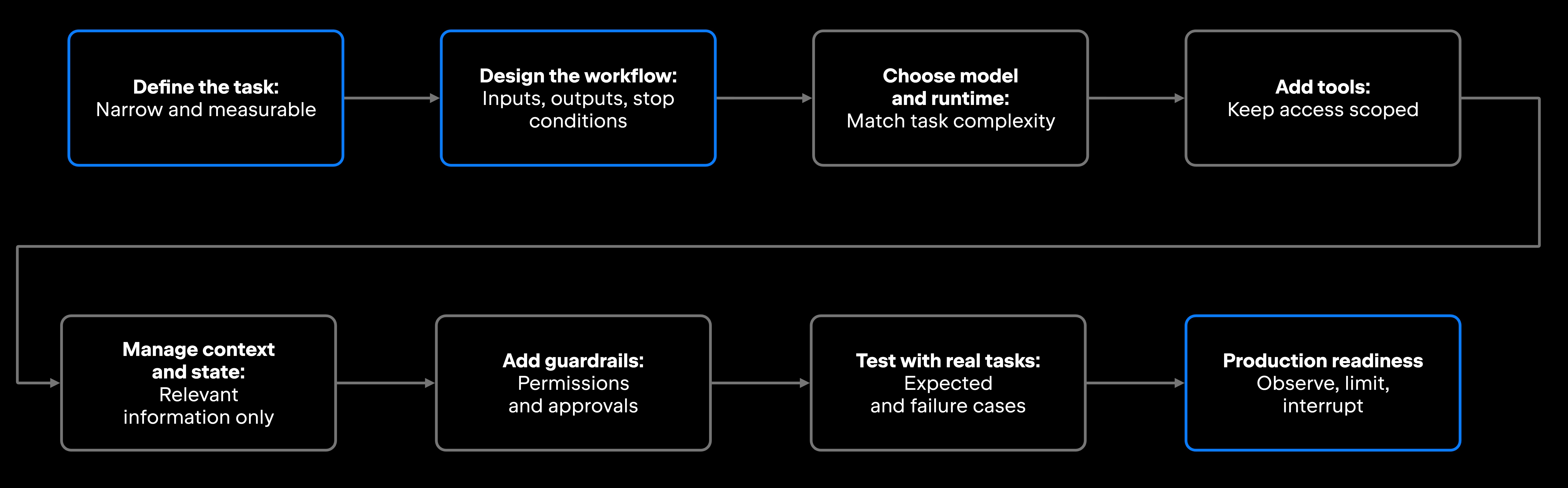
From idea to production: The AI agent build process

An overview of the key steps to go from a task to a production-ready agent.

AI agent development workflow

Agent scope and task definition

Agents that work reliably in production tend to start with a narrow, measurable task. Broad autonomy is what a narrow agent earns after it proves itself, so designing that autonomy in from the beginning works against you.

Good first-agent tasks look like this: summarize open GitHub issues by severity, generate test cases for a function, check whether API documentation matches current endpoint behavior, triage support tickets into categories, or produce a code review summary for a pull request. Each has a clear input, a defined output, and a measurable success condition.

Scope is a technical decision as much as a product one. It determines which tools you need, how much context to load, what permissions the agent requires, and what safeguards to add. A ticket-summarization agent that only reads data needs different controls than a deployment-preparation agent that can run shell commands.

Goal and expected outcome

"Help with code quality" is a direction. "Analyze the diff in this pull request and return a structured list of issues grouped by severity" is a task you can validate. Vague goals produce vague agents, and the difference between those two sentences is most of the design work.

Define what a successful run produces before you build. Make it concrete: a JSON report, a markdown summary, a patch proposal in diff format, a ranked list of test cases, a classification label, or a deployment checklist with each step flagged ready or blocked.

Workflow boundaries

Boundaries define what the agent may do, covering permissions as well as intended behavior. A well-scoped agent has explicit limits: reading files is allowed, writing them is not. Querying an API is fine, while calling an endpoint that changes state sits outside the line.

Sort the actions into low-risk and higher-risk classes while you draw that line: reading docs and running read-only analysis on one side, modifying files, executing shell commands, and triggering deployments on the other. Actions on the higher-risk side do not have to be forbidden outright. Mark them as escalation points, where the agent stops and hands the decision to you.

Agent workflow structure

A solid AI agent workflow maps out inputs, the decisions the agent makes, the actions it takes, the validations it runs, its outputs, and its stop conditions. Agent workflows become harder to control when any of these elements is missing or ambiguous, and unclear stop conditions are a common source of avoidable failures.

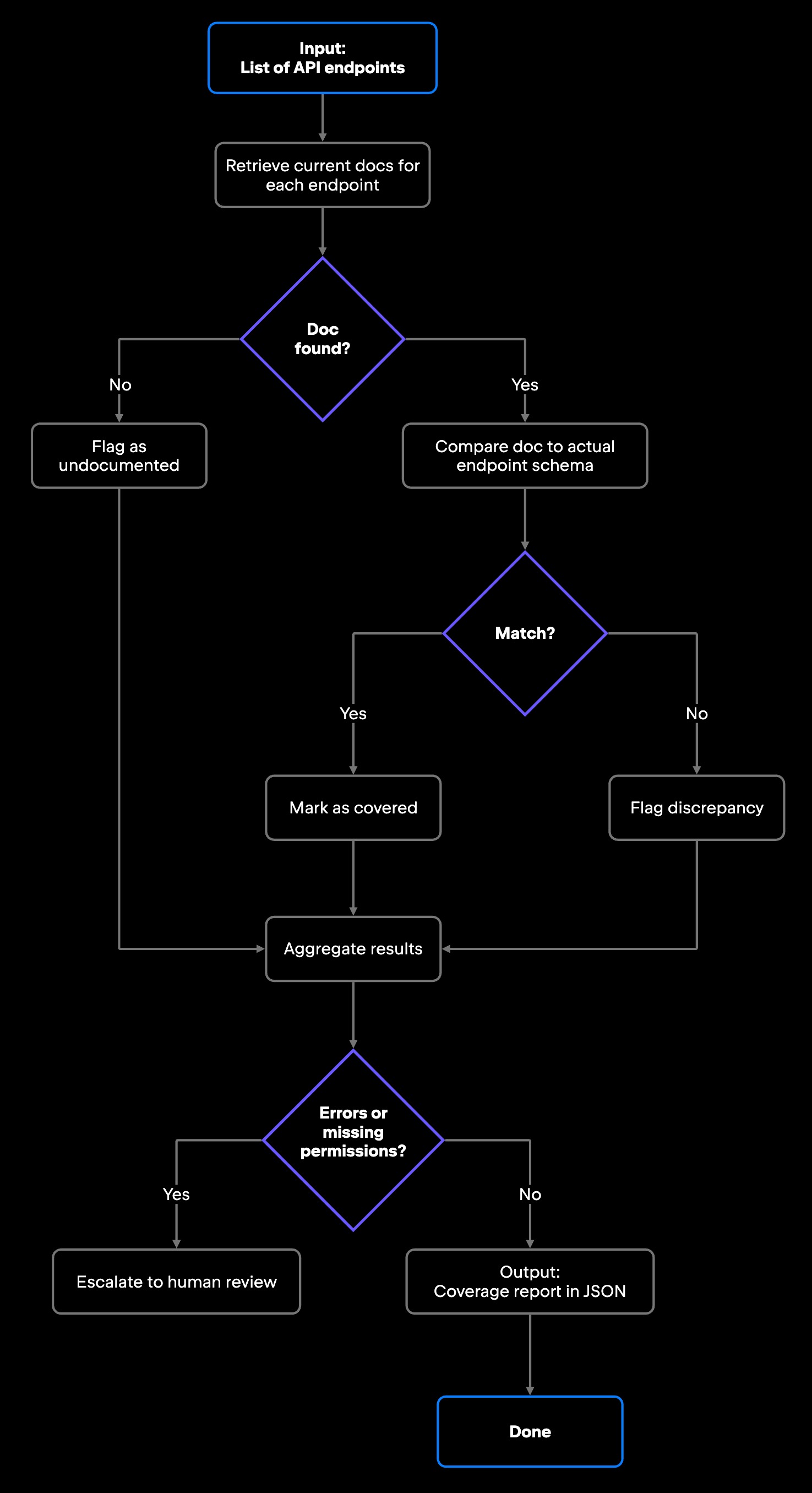
A documentation coverage agent shows a compact but complete workflow:

AI agent documentation coverage workflow

The AI agent loop drives this sequence: the model receives context, selects an action, observes the result, and decides whether to continue or stop.

Inputs and outputs

Inputs can be a natural-language prompt or a ticket description. They can also be selected files, repository context, log excerpts, prior tool results, or documentation. What you leave out matters as much as what you pass in: Give the agent the files a pull request touched, plus their tests, and it has a scope it can work through rather than a repository to triage.

Outputs should be structured and reviewable. JSON serves downstream processing better than free-form prose, and a markdown summary works well when a person reads the result. Whichever format you choose, define it upfront and validate that the model produces it consistently.

Decisions, actions, and stop conditions

Agents need explicit rules for choosing the next action, confirming that the action succeeded, and stopping.

Stop conditions are easy to defer, and deferring them is where agents go wrong. The common ones: the task completed and its output validated, validation failed after a set number of retries, a required permission was denied, the result is ambiguous enough to need human judgment, or the model is producing repeated errors. Skip that, and an agent with no retry cap keeps calling a failing tool, or returns wrong output with nothing signaling a problem.

Model and runtime setup

The model and runtime you choose affect latency, cost, and reasoning quality, along with tool-calling reliability and how you can deploy. What the task actually requires should drive the choice.

Model requirements

Simple agents that classify, extract, or summarize can work well with smaller and faster models. Agents that reason over a codebase, chain tool calls, or handle ambiguity need a more capable model, with stronger instruction-following and reliable function calling.

Two model capabilities carry most of the weight in AI agent implementation. Structured output support allows the model to return responses that follow a defined schema, making them easier to validate and process programmatically. Function calling means the model can select tools by name and provide structured arguments that your application can validate before execution. If a model handles either unreliably, expect more work later.

Execution environment

Agents can run locally during development, inside a backend service, in a CI/CD pipeline, inside an IDE integration, or on a cloud runtime. Each environment changes which permissions are available, how logging works, how failures surface, and which integrations you can reach.

An agent connected to a JetBrains IDE can query the IDE for context on demand rather than receiving the project pre-loaded, where that access has been granted. Junie, JetBrains' coding agent in the AI chat of JetBrains IDEs, calls for symbol resolution, usages, or project structure the same way you would run Find Usages by hand. Junie also follows project guidelines committed alongside the code, which are persistent instructions rather than knowledge of the repository.

In CI/CD or cloud environments, you shape the execution context through environment variables, secrets management, and scoped service accounts instead.

Tools and function calls

Tools let an AI agent move from generating outputs to interacting with external systems. With access to a test runner, repository search, or issue tracker, the agent can take actions, observe the results, and use them to continue the workflow. The same holds for the rest of the stack a developer works in: documentation systems, HTTP APIs, databases, and a terminal where the task genuinely calls for one.

Keep tool use and function calling scoped to what the task needs. A documentation coverage agent needs a doc-retrieval tool and a schema-comparison tool. It has no use for a deployment tool, a PR merge tool, or shell access. Unnecessary tools widen the surface area for mistakes, and choosing among them takes up effort better spent on execution.

Tool schemas

Each tool needs a name, a description the model can reason over, typed input parameters, and a defined return format. The description is an important signal for tool selection because the model uses it, together with the tool name and schema, to decide when a tool is appropriate. Vague descriptions can lead to less predictable choices.

Keeping each tool's scope tight also makes it easier to validate. A tool declared as get_endpoint_schema(endpoint: str) -> EndpointSchema gives you a typed contract to test against, where query_api(params: dict) -> Any gives you almost nothing.

Input and output validation

Every tool call should validate required fields before execution and validate the response before handing it back to the agent. Common failure modes include malformed parameters, unexpected response formats, empty results that the agent reads as valid data, and unsafe actions triggered by a misread parameter.

Return structured errors rather than raw exceptions. An agent that receives a named error, the action that failed, and the path it was denied has what it needs to decide whether to escalate, retry, or stop.

Context and state management

An agent needs enough context to finish its task, and no more. Loading every file, every prior turn, and every document your team has written can bury the signal in text that does not bear on the task. Manage AI agent context windows deliberately.

Relevant context selection

Select context based on task relevance and token budget, with permissions and recency shaping what is available. A code review agent might need the diff, affected tests, related implementations, or callers, while a documentation agent may only need the docs and endpoints in scope. The goal is to provide the context required for the task without loading the entire available knowledge base. Summarization and retrieval help when the context is genuinely large, though both add complexity and new failure points. Match the approach to the source of token pressure.

Progress tracking across actions

Most non-trivial agents take more than one step, so they need a record of which steps finished, which tool calls returned results, and the current task state.

An agent with no such record either restarts the whole task after an error or skips the failed step silently. Tracking also makes debugging tractable: you can see where the agent stopped making progress, rather than replaying an entire run.

Guardrails and human review

Progress tracking tells you what the agent did. Guardrails determine which actions the agent is allowed to take in the first place, and which of those need a person in the loop. Build them before you need them, because retrofitting guardrails onto an agent that has already caused a problem is painful.

Permissions and approval points

Assign permission levels based on impact, reversibility, and data sensitivity. Low-impact, reversible actions can often proceed automatically, while actions involving sensitive data, external side effects, or production systems should require tighter controls or explicit approval.

Isolation does the same job structurally. A sandbox, a scratch branch, or a container with a scoped service account limits how far a mistake can spread, which matters most early on.

Approval checkpoints do not have to be manual on every run. They can be automated conditions, such as pausing for review once a proposed change grows past the size you are willing to accept unreviewed. High-impact actions belong behind a logged, deliberate trigger.

Failure handling and escalation

Stop conditions describe when the agent finishes. Escalation covers what happens when it cannot. Decide in advance what happens when validation fails, when a required permission is missing, and when the agent repeats the same error. The default should be to stop and surface the current state.

Most first agents benefit from a simple rule: When the next action is irreversible, or the result is too uncertain to act on, hand it back for review. An agent stopping under those conditions is the design working.

Testing with real tasks

Testing an agent differs from testing a deterministic function. The same input can produce different valid outputs, tool calls may carry real side effects, and edge cases in agent behavior often stay hidden until you run against real data. So AI agent testing runs against real examples, and skipping it moves the problems into production.

Expected workflow tests

Run the agent against tasks it should complete end to end and confirm each finishes as intended: A well-described ticket comes back correctly classified as valid JSON, a documentation lookup returns the right page, a test run's result is read correctly, and a patch proposal applies cleanly to the branch it came from.

Failure and edge case tests

Run the agent against cases built to break it. What happens when the referenced ticket does not exist? When the doc retrieval API rejects the request as unauthorized? When a tool returns a malformed payload that the agent reads as valid data? When a misread parameter aims an action at the wrong target?

Two failure shapes are worth building deliberately: a request too ambiguous to act on, where the agent should escalate rather than guess, and the same error repeating across runs, where the retry cap should fire instead of the agent looping.

These are the runs that catch what end-to-end tests miss, before production does.

Production readiness

An agent is closer to production once you can observe what it does, limit what it can reach, reproduce its failures, and interrupt it safely.

Interruption deserves explicit design. A run you can stop mid-flight, and changes you can reverse through a scratch branch or a held-back merge, keep an early production trial recoverable.

Logging and monitoring

Production agents need structured observability for model and tool calls, state changes, errors, retries, and human approvals. This does not necessarily mean storing complete prompts and responses: depending on the data involved, teams may need metadata-only logging, redaction, restricted access, or limited retention. Free-form logs alone are difficult to query when you need answers quickly.

AI agent monitoring in production means being able to answer which tasks succeeded, which failed, and what the agent did in the steps leading up to each failure.

Cost, latency, and reliability checks

Measure token usage per task and tool-call latency. Track retry frequency, error rates, and task success rate alongside them. Conditions change as usage grows, so these numbers are worth watching continuously rather than sampling once.

AI agent cost management becomes a real concern at scale. Costs depend on model choice, the number of model calls, input and output tokens, retries, and tool or runtime costs. Context growth can become a significant driver in long-running workflows when large inputs are repeatedly sent across multiple iterations. Set token budgets and retry limits before production rather than after the first surprising invoice.

Reliability is the gate to check before you expand the agent's tool access or autonomy. An agent that completes its narrow task only intermittently is not ready for broader autonomy. The cause may be overly broad scope, weak tool design, poor context selection, model behavior, or unreliable external dependencies, and those issues should be understood before expanding access.

From first agent to production workflow

Creating an AI agent that reaches production comes down to a short list: a narrow task with clear boundaries, a small set of validated tools, real input and output validation, and success criteria you can measure. The hardest part is usually discipline, resisting the pull to expand scope before the first version is reliable.

Treat your first agent as a controlled workflow system rather than an unrestricted one, and widen its permissions only after it behaves reliably on the task you started with. Testing, monitoring, permissions, context management, and failure handling belong in that first version.

FAQ

What skills do developers need before building an AI agent?

A working understanding of the model's API (prompt construction, function calling, and structured output), basic familiarity with HTTP APIs and JSON, and enough systems thinking to design a workflow with defined inputs, outputs, and failure modes. AI agent development is software engineering applied to a new runtime rather than machine learning research.

How do teams decide when an AI agent is ready for wider use?

The bar: it completes its intended task reliably, failures are caught before they propagate, every action is logged, permissions are scoped to the minimum, and someone has deliberately tested the edge cases. The evidence is successful runs across a representative sample of real tasks, including failure cases.

Should a first AI agent use read-only data before it can take actions?

Yes, as a starting point. A read-only agent is easier to validate and debug, and restricting it to reads prevents unintended writes while you are still checking its behavior. Once it behaves reliably, with correct outputs, clean stop conditions, and predictable tool calls, extend it to write actions behind approval checkpoints.

What is a common mistake when building a first AI agent?

Defining the task too broadly. Developers building AI agents tend to design the agent they eventually want rather than the one they can validate now, and granting broad permissions upfront creates exposure that buys nothing. A narrow scope puts the real work in front of you: prompt design, tool validation, and context handling. Start narrow, make it reliable, then expand.

Damaso Sanoja

Damaso Sanoja is an engineer who is passionate about helping others make data-driven decisions to achieve their goals. This has motivated him to write numerous articles on the most popular relational databases, customer relationship management systems, enterprise resource planning systems, master data management tools, and, more recently, data warehouse systems used for machine learning and AI projects. You can blame this fixation on data management on his first computer being a Commodore 64 without a floppy disk.

JetBrains AI Solutions

Optimize your workflow. With AI built for you.

Junie

The AI coding agent with deep IDE integration that plans before it writes, then codes and tests while you stay in flow.

JetBrains AI in IDEs

Set of AI-powered capabilities built into JetBrains IDEs for software developers. It is not a standalone product or service, but an IDE-native experience composed of AI features, LLMs, agents, and integrations.

AIR

Agentic Development Environment for engineering teams building products with AI.

AI for Teams and Organizations

An open system for agentic software development. Govern AI access across your engineering org, manage agents and models, and keep costs under control.

JetBrains Context

A repository intelligence layer for coding agents. It builds a semantic index of your codebase so agents retrieve what they need instead of exploring it file by file.

Central CLI

One CLI for every terminal agent. Claude Code, Codex, Gemini, and others plug into JetBrains AI and behave exactly as they do standalone. Access is granted centrally and instantly, with models, limits, and usage analytics governed in one place.

Continue Exploring the AI Agents for Developers Guide

What Are AI Agents?

Discover what AI agents are, how they work, their architecture, types, use cases, and how developers can build intelligent autonomous systems.

What Is Model Context Protocol?

Learn what Model Context Protocol (MCP) is, how it connects AI agents with external tools and data, and why it matters for developers.

Memory in AI Agents

Learn how memory enables AI agents to retain context, manage long-term knowledge, and improve planning, reasoning, and multistep task execution.